
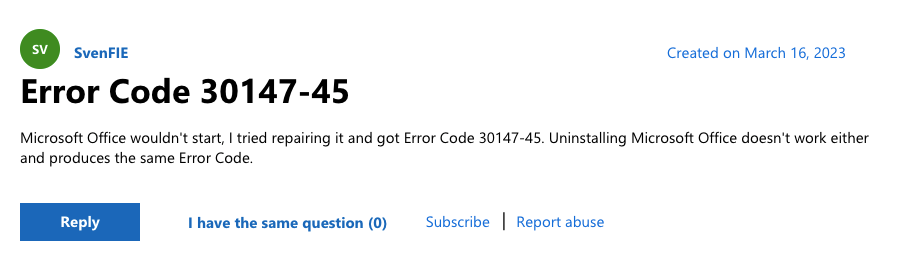
As per the users when they try to access Microsoft Office, it wouldn’t start and when they try to repair it they receive the error code 30147-45. As of now while we are writing this article there is no official information shared by Microsoft on this error that why this error occurs in the first place, and how anyone can resolve it.
But during our research, we have come upon many threads by the users in the Microsoft community. And from those threads, we were able to find some valuable information to resolve this error. Below we are going to mention all the details of this error that we have gathered in our research.
How To Fix Microsoft Office Error Code 30147-45?
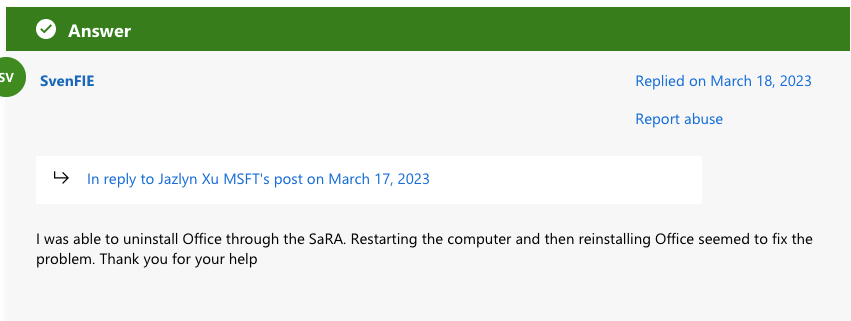
Fix 1: Uninstall And Reinstall The Microsoft Office
During our research on this error, we found some threads in the Microsoft community where users have complained about this error, and in response to those complaints, the Microsoft team has suggested uninstalling Microsoft Office and then reinstalling it.
So we will suggest you do the same, simply uninstall Microsoft Office and then reinstall it.
- Use this official link to download the Office uninstall tool.
- Restart your device once Microsoft Office gets uninstalled from your device completely.
- After that Reinstall the Microsoft Office.
- Now check if the error still persists.
Fix 2: Consider Disabling The Firewall And Antivirus Temporarily
If uninstalling and reinstalling Microsoft office is not fixing the issue then disable your device firewall and Antivirus software temporarily to find if they are conflicting with Microsoft Office and showing the error.
If disabling the Firewall and Antivirus software on your device fixes the issue then check their settings. Also, make sure to add Microsoft Office under their exception list.
Fix 3: Use Microsoft SaRA
If disabling your device’s Firewall and Antivirus program is not fixing the issue then use Microsoft SaRA.
Microsoft SaRA means “Microsoft Support and Recovery Assistant”. It runs tests on your device to find out what’s wrong and offers the best solution for the identified problem. Microsoft SaRA can currently help you fix Office, Microsoft 365, or Outlook problems.
- Go here to download the Microsoft SaRA.
- Install the Microsoft SaRA once it is downloaded to your device.
- Then run the Microsoft SaRA on your device.
Fix 4: Run A Clean Boot In Windows
If the error still doesn’t resolve then try running a clean boot in windows to find if background programs are interfering with the Office.
If you don’t know how to perform a Clean Boot then you can find the step-by-step instruction here in this official guide.
Fix 5: Get In Touch With Support
If you continue to receive this error and you are done with the above-given suggestions then get in touch with Microsoft support to report this error and ask for possible resolutions.
Like This Post? Checkout More
